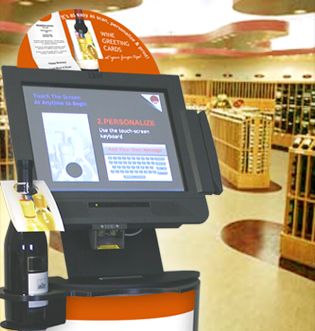
By some estimates, an average of more than 125 new self-service kiosks have been installed in North America every day for several years now. Retailers have been wondering for years if kiosks can handle their operations. Why is a new kiosk coming online approximately every 11 minutes? Because kiosks have proven to be a highly effective tool for customer satisfaction and improved responsiveness: 88 percent of best-in-class kiosk operators improved customer satisfaction, 63 percent reduced customer churn, and a full 100 percent reduced labor costs.1 Overall, all retailers using kiosks improved customer satisfaction by an average of 58 percent.
What You Need to Know to Work with Kiosks
By some estimates, an average of more than 125 new self-service kiosks have been installed in North America every day for several years now. Retailers have been wondering for years if kiosks can handle their transactions. Why is a new kiosk coming online approximately every 11 minutes? Because kiosks have proven to be a highly effective tool for customer satisfaction and improved operational efficiency: 88 percent of best-in-class kiosk operators improved customer satisfaction, 63 percent reduced customer churn, and 100 percent reduced labor costs. Overall, all retailers using kiosks improved customer satisfaction by an average of 58 percent.
While adoption is progressing rapidly, the process of developing and implementing a kiosk system for individual retail locations is complex. Typically, such projects take at least a year from planning to implementation. To maximize the benefits, most kiosks are integrated into existing in-store information systems. This is time-consuming because kiosk applications and development environments often differ from those of retail applications and require different skills.
There are also different requirements for kiosks as hardware. Employees using POS systems and handheld computers should be better trained than customers using kiosks. When a problem occurs with POS systems, store staff troubleshoots the issue or at least alerts management. However, if intelligent alerts and management features are built into the kiosk, hardware failures may go undetected for hours, leaving the kiosk inoperable and resulting in the opposite of the intended effect – frustrated customers. A reliable user interface is crucial to the successful use of kiosks. This document highlights some key retail considerations to consider when deciding to deploy a kiosk system. It covers the pros and cons of implementing kiosks in-house or through independent software vendors (ISVs) and provides an overview of what to expect during the project planning and development process. It also highlights important design considerations, explains which features are related to reliability, and identifies the resources and skills needed to develop, integrate, and support a kiosk system.
One Size Doesn't Fit All
Kiosk-based solutions are becoming increasingly common, but they are almost always custom-made. Retailers rarely have the luxury of purchasing a ready-made kiosk solution. The main reason is that the design, user interface, and applications in the kiosk must be carefully selected for specific business processes. Kiosks can be used to provide a customer experience that will lead to a consistent increase in sales or to reduce labor costs. But a single kiosk can rarely achieve all of these objectives.
Often, the most targeted kiosk solutions are the most effective. For example, Zebra Technologies worked with a client who wanted to improve their coupon rate, which fluctuated between 0.5 and 1.0 percent. The client had a clear vision for what they wanted to achieve, and the kiosk system was tailored to their needs. They worked with a kiosk solution developer with extensive retail experience, who successfully integrated the kiosk application into the retailer's existing loyalty program. As a result, coupon rates increased by more than 7 percent, a success for the client and a significant impact for vendors of other customer loyalty systems. In many projects, organizations either lack the specialized skills to develop and implement a kiosk system or are unwilling to involve their IT staff in the project. Further implementation, support and modifications do not cause much concern, since kiosk solutions are generally very stable once they are properly implemented and usually do not require frequent updates and software changes.
If a decision is made to implement a kiosk solution, then the personnel responsible for this in the organization must answer several key questions to determine their readiness:
Who will develop and write applications?
Is it possible to integrate the new system with existing loyalty systems, POS, inventory management, etc.?
Who will design and manufacture the kiosks?
Who will be responsible for technical support, software maintenance and hardware repair?
How will the kiosks be advertised to customers? What will we do to educate customers and encourage usage?
How much time and resources are needed to train employees on kiosks?
Will staff resist the implementation of kiosks?
What needs to be done to ensure employees maintain the system?
How much time do employees need for routine repairs and troubleshooting?
The answers to these questions will go a long way in determining a retailer's readiness to implement kiosk systems. The following sections provide answers to these questions to help retailers develop their own strategies for kiosk development, deployment, and maintenance.
Understanding Design
When determining needs and capabilities, it is helpful to break the project into three categories:
Software development and implementation
Hardware and component design selection
Daily operating costs plus regular maintenance and support
In practice, retailers typically customize software to their requirements. According to a 2008 study, off-the-shelf software is used in approximately one in five projects, and even this is often customized. Large companies are likely to use in-house resources for development, but even large firms often use independent software vendors (ISVs) due to a lack of the necessary time and expertise. In-house staff is always involved for integration, but the majority of the work is performed off-site. Kiosk design and production are almost always outsourced to a contract vendor. Another option is to handle application maintenance and support in-house. Software and hardware support can be handled separately. As with the design stage, companies are more likely to contract with a third-party hardware maintenance organization. Software and additional application maintenance is also often handled by contract ISVs, but it is not uncommon for retailers to handle all support in-house immediately after the initial application development and deployment.
Software
The application itself plays a crucial role in determining the success of kiosk projects. As noted, customers typically receive minimal instructions on how to use the kiosk system. Therefore, the interface should be highly intuitive and adaptable to users with varying experience and computer skills.




 RSS Feed